Comparison · Researched · Updated
Geekom vs Minisforum: which AI mini PC brand?
Researched brand comparison of Geekom and Minisforum: A9 Max vs AI X1 Pro at the Ryzen AI 9 HX 470 tier, A9 Mega vs MS-S1 Max at the Ryzen AI Max+ 395 tier, prices, expansion and warranty.
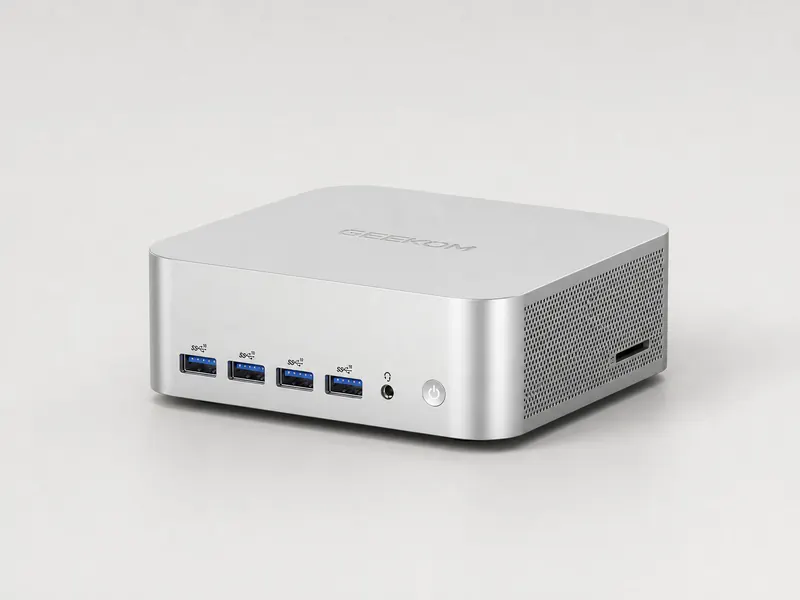
Geekom
Geekom's A9 Max (from $1,499) and A9 Mega ($3,799) are our starting-point picks at both AI mini PC tiers.
Choose it if: You want the general desktop or single-user workstation and no Minisforum-specific feature is a firm requirement.
Check pricefrom $1,499 →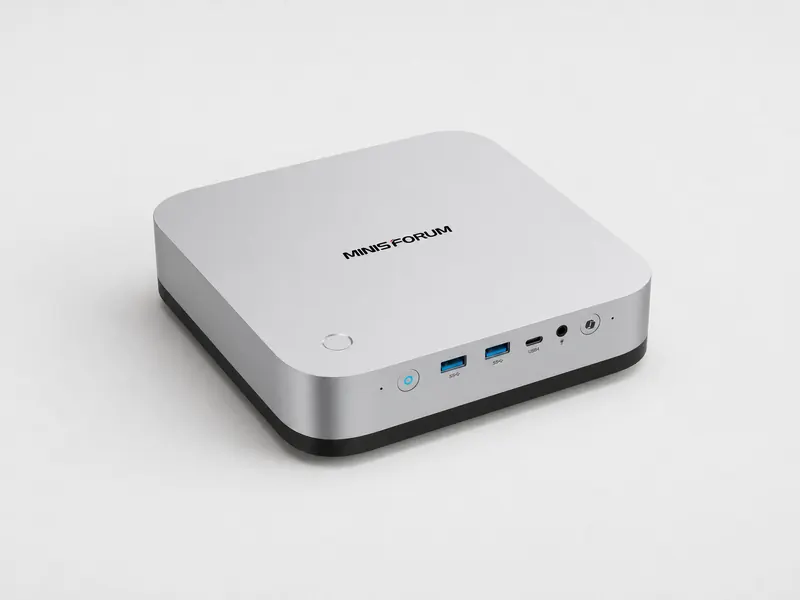
Minisforum
Minisforum's AI X1 Pro (from $1,199) and MS-S1 Max ($3,799) suit buyers who need native OCuLink or workstation networking.
Choose it if: Native OCuLink for an external GPU or workstation networking and expansion is a firm requirement.
Check pricefrom $1,199 →Short answer
Geekom is our pick for a general AI mini PC purchase, with the A9 Max from $1,499 for an everyday desktop and the A9 Mega at $3,799 for larger local models. Choose Geekom if you want the general desktop or single-user workstation and no Minisforum-specific feature is a firm requirement. Choose Minisforum, with the AI X1 Pro from $1,199 or the MS-S1 Max at $3,799, if native OCuLink for an external GPU or workstation networking and expansion is a firm requirement.
Round by round
| Round | Geekom | Minisforum | Winner |
|---|---|---|---|
| Everyday desktop (Ryzen AI 9 HX 470 tier) | Geekom A9 Max, from $1,499, is our preferred general desktop starting point. Complete configuration matters more than the shared chip tier. | Minisforum AI X1 Pro, from $1,199, is the cheaper entry at the same tier. Choose it when OCuLink is part of a costed external-GPU plan. | Geekom |
| Larger local models (Ryzen AI Max+ 395 tier) | Geekom A9 Mega at $3,799 is our preference for a single-user workstation for larger local models. | Minisforum MS-S1 Max at $3,799 targets buyers who can use its network and expansion features. Same price, different buyer. | Geekom |
| Expansion and OCuLink | No native OCuLink advertised on the Geekom models on this page. Buy Geekom for the machine, not for an external-GPU plan. | Native OCuLink is the reason to switch to Minisforum. It is a real advantage only with a costed external-GPU plan. | Minisforum |
| Workstation networking | Standard desktop connectivity advertised. Enough for a single-user workstation. | MS-S1 Max targets workstation networking and expansion. That is the Minisforum specialist fit. | Minisforum |
| Price at the 470 tier | A9 Max from $1,499. | AI X1 Pro from $1,199. The lower starting price, before matching configurations. | Minisforum |
| Price at the Max+ 395 tier | A9 Mega at $3,799. | MS-S1 Max at $3,799. A tie on sticker price; match installed memory before comparing. | Tie |
| Configuration comparability | Geekom sells complete configurations; compare the installed memory and storage of the exact SKU. | Minisforum lists 'from' prices at the 470 tier; a higher-priced 128GB offer is not equivalent to a 64GB alternative. | Tie |
| Warranty and support | Compare Geekom's written warranty for your country and seller: duration, return route, covered faults, shipping responsibility. | Same advice for Minisforum. Neither brand has a measured service-quality result in this comparison. | Tie |
| Overall | 2 rounds | 3 rounds | Geekom |
3 rounds tied.
Specs side by side
| Spec | Geekom | Minisforum |
|---|---|---|
| Everyday desktop | A9 Max, from $1,499 | AI X1 Pro, from $1,199 |
| Workstation | A9 Mega, $3,799 | MS-S1 Max, $3,799 |
| Chip tiers covered | Ryzen AI 9 HX 470 and Ryzen AI Max+ 395 | Ryzen AI 9 HX 470 and Ryzen AI Max+ 395 |
| Native OCuLink | Not advertised on these models | Advertised; the reason to switch |
| Workstation networking | Standard desktop connectivity | MS-S1 Max targets it |
| Warranty | Compare regional policy and seller terms | Compare regional policy and seller terms |
Geekom vs Minisforum at the Ryzen AI 9 HX 470 tier
Geekom's A9 Max, from $1,499, is our preferred starting point at the Ryzen AI 9 HX 470 tier, ahead of Minisforum's AI X1 Pro, from $1,199. That is an editorial recommendation from published specifications and prices, not a measured performance result: no mini PC has been run in Testbench Lab tests yet, and there is no test-centre data for this category.
The two machines belong in a similar processor tier, but the complete configurations differ, and the complete configuration is what you buy. A shared chip does not make two machines equivalent. Memory installed, memory arrangement, storage, cooling and the ports you actually use separate them more than the chip name does. Two machines with the same processor name on the box can differ by thousands of dollars of memory and storage, and for local AI workloads that difference is the purchase decision, not a footnote.
Minisforum's lower starting price is real money. AI X1 Pro starts at $1,199 against $1,499 for A9 Max, a $300 gap at the entry point. But 'from' prices are entry configurations. A higher-priced 128GB offer is not equivalent to a 64GB alternative, and the same caution applies on both sides. Decide the memory you need for the models you want to run, then price that configuration on each store. The gap can shrink, vanish or reverse once you do.
| Geekom A9 Max | Minisforum AI X1 Pro | |
|---|---|---|
| Price | From $1,499 | From $1,199 |
| Chip tier | Ryzen AI 9 HX 470 | Ryzen AI 9 HX 470 |
| Our call | General desktop starting point | Switch when OCuLink is a costed plan |
| Full comparison | geekom a9 max vs minisforum ai x1 pro | Same page |
What does that $300 mean for a buyer? If the entry configuration on each store page already meets your memory and storage needs, Minisforum's AI X1 Pro is the cheaper route to the same chip tier, and that is worth taking seriously. If it does not, the sticker gap tells you nothing, because you are not buying the sticker configuration. Price the machine you will actually order, then compare the totals, including tax and shipping.
The one firm reason to switch to the Minisforum at this tier is native OCuLink. OCuLink is a high-bandwidth connection for an external GPU enclosure, and it matters if you have a costed plan for one — a specific enclosure, a specific card, a price you have checked. Choose the Minisforum when OCuLink is part of that plan, rather than assuming it will be useful someday. An unused port is not worth rearranging a purchase around, and an external-GPU plan that exists only in intention is not a plan.
For everything else at this tier — everyday desktop use, smaller local models, the general run of work — our preference stays with the A9 Max. That preference is about the complete package as a general desktop, not a claim that the A9 Max is faster in every task. Neither machine has a measured score from us yet.
The machine-level detail is in the geekom a9 max review and the minisforum ai x1 pro review, and the head-to-head is geekom a9 max vs minisforum ai x1 pro. Prices on this page were checked 2 October 2026; re-check both store pages before you buy, because mini PC pricing moves with promotions and configuration changes.
Geekom vs Minisforum at the Ryzen AI Max+ 395 tier
Geekom's A9 Mega at $3,799 is our preference for a single-user workstation built around the Ryzen AI Max+ 395, over Minisforum's MS-S1 Max at the same $3,799. The sticker prices are identical; the buyers are not.
MS-S1 Max targets buyers who can use its network and expansion features. If your work needs workstation networking — the connectivity a shared or rack-adjacent setup uses — or the expansion paths MS-S1 Max advertises, that is a real reason to buy it, and this comparison does not take it away. If it does not, you would be paying for ports you never touch, and at $3,799 that is a lot of unused hardware.
A9 Mega is the simpler proposition: one powerful machine for one user, with the memory and storage in the box matched to the local-model workloads this chip tier exists for. For larger local models, memory capacity is usually the first constraint, so match installed memory before comparing the machines at all. Two $3,799 machines with different memory are not the same offer, and the one with more memory is usually the better one for this tier's purpose, whatever the brand.
| Geekom A9 Mega | Minisforum MS-S1 Max | |
|---|---|---|
| Price | $3,799 | $3,799 |
| Chip | Ryzen AI Max+ 395 | Ryzen AI Max+ 395 |
| Our call | Single-user workstation | Networking or expansion requirements |
| Full comparison | geekom a9 mega vs minisforum ms-s1 max | Same page |
What does each figure mean for a buyer here? The matching $3,799 prices mean the decision is entirely about configuration and features, not money. The Ryzen AI Max+ 395 name on both machines means the raw compute tier is the same on paper; what differs is everything around it. And the memory point decides most purchases at this tier: a machine bought for larger local models that arrives with less memory than the models need has wasted the most expensive part of the budget.
These are advertised configurations from each manufacturer's store page, checked 2 October 2026, not benchmark results. The matched model, memory arrangement and supported backend remain the basis of any performance comparison, and neither brand has a measured score from us yet. When units are run, the results will be added to the model-level pages, with their conditions — the tests themselves are already set out in the lab test brief.
The practical buying sequence at this tier is short. First, list the models you want to run and the memory they need. Second, find the exact SKU on each store page that meets that. Third, compare the two totals. Fourth, only then ask whether MS-S1 Max's networking and expansion, or anything else in the feature list, changes the answer. Most buyers will find the first three steps decide it.
The device detail is in the geekom a9 mega and minisforum ms-s1 max review pages, and the head-to-head is geekom a9 mega vs minisforum ms-s1 max.
Warranty and support
Neither Geekom nor Minisforum has a measured warranty or support winner in this comparison. Compare the written warranty for your country and your seller before you buy either brand.
Duration matters, but so do the return route, the covered faults and who is responsible for shipping. A three-year policy with an awkward return route can be worse to live with than a one-year policy with a simple one. Read the policy document, not the marketing summary of it.
| What to check | Why it matters |
|---|---|
| Duration | The headline number, but only one factor |
| Return route | Where the unit goes, and who pays, when something fails |
| Covered faults | What the policy excludes |
| Shipping responsibility | Cross-border returns can cost more than the repair |
| Seller terms | A marketplace seller's terms can differ from the manufacturer's |
Each row of that table is a question to put to the store page or the policy document before checkout, not after a failure. The seller row deserves particular attention for mini PCs, because these machines are often sold through storefronts as well as manufacturer stores, and the manufacturer's warranty does not always follow the marketplace purchase cleanly. If you cannot find the regional policy document for the exact machine and country, treat that absence as information.
A policy is not a measured service-quality result, and this comparison does not claim a tested support winner. If warranty length is the deciding factor for you, get the current regional documents from both manufacturers on the day you buy, because warranty terms change more often than specifications do. A page that says 'one year' today may say something else next quarter, and a comparison written on 2 October 2026 cannot speak for a policy you read in March.
The same caution applies to both brands equally. We have no support tickets, repair records or response-time measurements for either company in this comparison. What we can say is structural: both are brands whose machines sit at the same price tiers, so neither buyer is obviously taking more warranty risk than the other on price alone. The difference, if there is one, lives in the document for your country, and you can read it in five minutes before you commit four figures.
Which brand should you buy?
Start with Geekom unless a Minisforum feature solves a specific requirement. That is our editorial recommendation, not a claim that Geekom is faster in every task.
For most buyers the decision is simpler than the brand question suggests. If you want an everyday desktop, the Geekom A9 Max from $1,499 is our starting point. If you want a single-user workstation for larger local models, the Geekom A9 Mega at $3,799 is our preference. Both are covered in the ai mini pc category, alongside the other machines we track.
| Workload | Our preferred starting point | Minisforum reason to switch |
|---|---|---|
| Everyday desktop and smaller models | Geekom A9 Max, from $1,499 | Native OCuLink requirement (AI X1 Pro, from $1,199) |
| Larger local models | Geekom A9 Mega, $3,799 | MS-S1 Max networking or expansion, $3,799 |
Switch to Minisforum when one of two things is true. First, native OCuLink is part of a costed external-GPU plan — then the AI X1 Pro is the machine that supports it. Second, workstation networking or expansion is a firm requirement — then the MS-S1 Max is built for that buyer. Both are good machines; they are specialist fits rather than general ones, and a specialist fit is the right purchase when the requirement is real.
Do not switch for the entry price alone. The $300 gap at the 470 tier is an entry-configuration gap, and the configuration you actually need is the one to price. Do not switch on brand loyalty either: the matched model, memory arrangement and supported backend remain the basis of any performance comparison, and neither brand has a measured win from us yet. When Testbench Lab runs these units, the results will sit on the model-level pages and feed back into this brand verdict.
There is also a case where the brand question dissolves entirely. If your requirement list names OCuLink, workstation networking and a specific memory target, the list itself picks the machine, and the badge on the box is the last thing you check. Write the requirement list before the store page, not after it.
Prices and store links checked 2 October 2026. Re-check both store pages on the day you buy, because mini PC pricing moves with promotions and configuration changes. The next step for most readers is the model-level head-to-head: geekom a9 max vs minisforum ai x1 pro at the 470 tier, or geekom a9 mega vs minisforum ms-s1 max at the Max+ 395 tier.
Frequently asked questions
Is Geekom better than Minisforum?
Geekom is our overall pick for a general AI mini PC purchase. Minisforum can be a better specialist fit for an expansion or networking requirement: native OCuLink on the AI X1 Pro, or workstation networking and expansion on the MS-S1 Max. Neither brand has a measured performance win from us yet; this is an editorial recommendation from published specifications and prices.
Which mini PC brand has the best warranty?
Neither brand has a proven warranty advantage here. Compare the exact regional warranties and seller terms for the machine you are buying: duration, return route, covered faults and shipping responsibility. A longer published duration alone does not establish a better support experience, and we have no measured support-quality results for either brand.
Sources
- [1]Geekom A9 Max product page — Price from $1,499, Ryzen AI 9 HX 470 tier, store link. Checked 2 October 2026.
- [2]Geekom A9 Mega product page — Price $3,799, Ryzen AI Max+ 395, store link. Checked 2 October 2026.
- [3]Minisforum AI X1 Pro-470 store page — Price from $1,199, Ryzen AI 9 HX 470 tier, OCuLink. Checked 2 October 2026.
- [4]Minisforum MS-S1 Max store page — Price $3,799, Ryzen AI Max+ 395, workstation networking and expansion. Checked 2 October 2026.