If you want one tool that records the whole lecture, turns it into a transcript and summary, and does not run out of minutes in week three, start with Notta Pro. It costs $97.99 a year before the education discount (advertised as 50% off with an educational email), and it allows 5 hours per recording and 1,800 minutes a month — enough for a full timetable of 50-180 minute lectures without hitting a cap mid-class. Otter.ai Pro ($79.99 a year with a .edu address) is the strongest pick for live English transcripts in class and on Zoom, but each recording stops at 90 minutes, which can cut off a long lecture. Genio Notes is the pick if your disability service supplies it, Notability if you handwrite on an iPad, and Apple Notes or Google Recorder if you want something free that is already on your phone. For big lecture halls, a dedicated recorder like the Plaud Note Pro captures audio more reliably than a phone. All prices checked 29 October 2026.
01 — Best overall
Notta
Price
Pro: $97.99/year ($8.17/month) Student: Education discount advertised as 50% off with an educational email; confirm it applies to the annual plan before buying
Notta Pro is the AI note taker we would start with for lectures because its limits are built for them: 5 hours per recording and 1,800 minutes a month. A 180-minute lecture fits inside a single recording with room to spare, and a full weekly timetable fits inside the monthly allowance. You get a live transcript while the lecture is happening, apps for mobile, desktop and web, transcription in 58 languages, and live translation (2 uses/month included) — useful if you study in a second language. The free plan (120 minutes a month, 3 minutes per conversation) is only enough to try it, so budget for Pro if lectures are the main use.
Choose it if: You want one tool that records, transcribes and summarizes every lecture on your timetable without a per-recording cap getting in the way.
02 — Best for live English transcripts and online classes
Otter.ai
Price
Pro: $16.99/month or $8.33/month annual Student: 20% off with a .edu address: $13.59/month or $79.99/year
Otter's live transcript is excellent for English lectures, and it works on your phone in the room as well as on Zoom, Google Meet and Teams for online classes. The catch for lectures is the cap: each conversation stops at 90 minutes on Pro (30 minutes on the free Basic plan), so a two-hour lecture either needs a restart or loses the tail. You get 1,200 minutes a month and 10 audio imports a month.
Choose it if: Your lectures are mostly in English, under 90 minutes, and often on Zoom or Teams.
03 — Best for accommodation and structured lecture notes
Genio Notes
Price
Individual: From £12/month or from £144/year (USD price unverified) Student: Often supplied free by university disability services — ask yours first
Genio Notes (formerly Glean) is built specifically for lectures: it records audio, lets you take timestamped notes and labels during class, imports slides, and produces a transcript after the session. Many disability services supply it to students with a recording accommodation, so check with yours before paying. A 30-day free trial needs no payment details. Live captions are not on individual plans.
Choose it if: You have a disability accommodation for recording, or you want a tool designed around lecture-style note taking rather than meetings.
Pro: Plus $15.99/year; Pro $79.99/year Student: No advertised student discount; confirm current pricing in the app
Notability syncs audio to your handwriting, so tapping a word you wrote replays what the lecturer said at that moment — the best way to combine ink notes with a recording. Transcription differs by tier: Plus is limited, while Pro includes unlimited live audio transcriptions. It only transcribes while you record, so it suits live lectures rather than imported audio.
Choose it if: You take handwritten notes on an iPad and want the audio synced to your ink.
Apple Notes records audio with a live transcript on iPhone 12 or later in 10 device languages, and can summarize the recording if your phone supports Apple Intelligence (iPhone 15 Pro or later). Google Recorder does the same on Pixel phones, with summaries on Pixel 8 or later. Neither matches a dedicated note taker's organization or exports, but for a free tool already on your phone they are genuinely usable for a lecture.
Choose it if: You want to try lecture transcription without paying anything.
Starter (with device): $189 (site price, checked 2 October 2026) Student: No advertised student discount
Type
Card recorder
Assessment
Hands-on + test-centre data
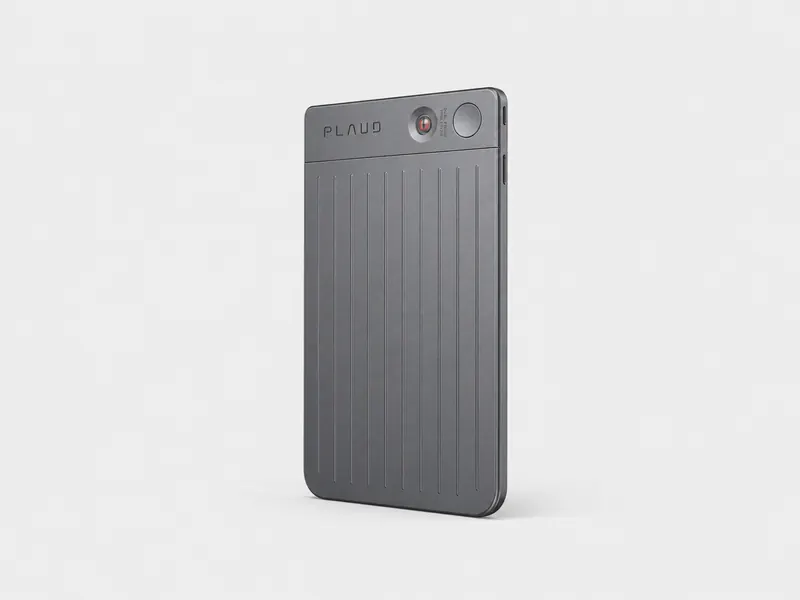
In a 6-speaker class-scenario test from August 2026, the Plaud Note Pro recorded the lowest English word error rate of the recorders tested (17.5%). The Starter plan includes 300 free transcription minutes a month, and the device can record up to 30 hours. It is a hardware purchase rather than a subscription, so it suits students who sit far from the lecturer in big halls where a phone mic struggles.
Choose it if: You sit in large halls where a phone microphone is not enough, and you are happy to buy a recorder.
Per-recording cap: the single most common way a note taker fails a lecture. We recorded the maximum length each plan allows per recording, because a 90-minute cap silently truncates a 2-hour lecture.
Monthly minutes: whether a full timetable of lectures fits inside the monthly allowance on the entry paid plan.
Live transcript: whether you can watch words appear during the lecture, or only get a transcript after class.
Student price: the list price and any education discount, including what the discount requires (.edu email, verification).
Platforms: whether the tool works on phone, desktop and web, and whether it captures in-person audio as well as online classes.
Exports: whether transcripts and summaries can be exported in formats you can actually revise from (txt, pdf, docx, srt).
Hands-on trial by David Wilson, with vendor pages checked on the publish date. Competitor plan-limit research was checked on 2 September 2026.
What makes an AI note taker good for lectures?
The first thing to check is the per-recording cap, because it is where most free and cheap plans fail a lecture. A tool with a 30- or 90-minute maximum per recording will silently stop partway through a 2-hour class, and you will not find out until you open the transcript afterwards. The second thing is monthly minutes: a typical timetable of four 2-hour lectures a week is roughly 1,600-2,000 minutes a month during term, which exhausts many entry plans by week three. The third is whether you get a live transcript you can follow — and highlight — while the lecture is happening, or only a transcript after class.
Notta Pro leads on all three: 5 hours per recording, 1,800 minutes a month, and a live transcript on mobile, desktop and web. Otter.ai matches the live transcript quality in English but caps each conversation at 90 minutes on Pro. Here is how the main options compare on the limits that decide a lecture (plan data from competitor research, checked 2 September 2026, and vendor pages checked 29 October 2026):
The cheapest paid student plan among our picks is Otter.ai Pro with the .edu discount at $79.99 a year, followed closely by Notta Pro at $97.99 a year before its education discount — and Notta's discount is advertised as 50% off with an educational email, which, if it applies to the annual plan, would make it the cheapest pick of all. Confirm the discount terms on Notta's pricing page before buying. Genio Notes is often free if your disability service supplies it. Here is the full picture (prices checked 29 October 2026):
Tool
List price
Student price
What the discount needs
Notta
Pro $97.99/yr ($8.17/mo)
50% off advertised
Educational email; confirm it applies to annual
Otter.ai
Pro $16.99/mo or $8.33/mo annual
$13.59/mo or $79.99/yr
.edu email verification
Genio Notes
From £12/mo or £144/yr
Often free via disability services
Institution-supplied licence
Notability
Plus $15.99/yr; Pro $79.99/yr
None advertised
—
Apple Notes / Google Recorder
Free
Free
Nothing
Plaud Note Pro
$189 (device)
None advertised
—
One warning: Otter's pricing page also shows asterisked promotional prices ($8.49 and $4.17 per month). Read the terms before assuming a promo price, and always check whether a discount applies to the annual rather than the monthly plan.
Which AI note taker works for online lectures on Zoom or Teams?
For online classes, the two picks that matter are Otter.ai and Notta. Otter joins Zoom, Google Meet and Microsoft Teams and produces its strong live English transcript inside the meeting window. Notta covers online lectures through its desktop app and bot-free capture, so you can record the class without a visible bot in the participant list — handy if your instructor is strict about meeting bots — and its 5-hour per-recording limit means even a long online seminar finishes in one piece. If your lectures are in a language other than English, Notta's 58 transcription languages give it a clear edge over Otter's six. For step-by-step recording instructions, see our guides on how to record a Zoom meeting and how to record a Teams meeting.
Which is best if you take handwritten notes on an iPad?
If you write by hand, the choice is between Notability and Goodnotes. Notability syncs audio to your handwriting — tap a word you wrote and it replays what the lecturer said at that moment — and its Pro tier ($79.99/year) includes unlimited live audio transcriptions, while the cheaper Plus tier is limited. Goodnotes also records alongside your notes, but its transcription only works while you are recording, stops transcribing after 3 hours, and cannot transcribe audio you have already recorded. For lecture use, Notability is the stronger of the two. If you mainly want a transcript and summary rather than ink, Notta's mobile app records the lecture while you write in any app you like, and its transcript and summary are waiting for you afterwards.
What if you have a disability accommodation for recording?
If your disability service has approved recording as an accommodation, ask whether your institution supplies Genio Notes (formerly Glean) before buying anything — many universities hold licences. Genio is purpose-built for this: audio, timestamped notes, labels and imported slides during class, with a transcript afterwards, and its Quiz Me feature on the annual plan helps with revision. Rutgers' Office of Disability Services notes that recording under Section 504 is for personal study use only, which is the norm at US institutions. For more on device choice and policy, see our guide to how to record lectures.
Do you need a dedicated recorder for a big lecture hall?
In a large hall, the phone on your desk is often the weakest link. Class-scenario tests from August 2026 (6 speakers, open training room, in person, a single recorded session per product) and our hands-on use point the same way: a dedicated recorder placed near the front beats a phone mic at the back. The Plaud Note Pro costs $189 and includes 300 free transcription minutes a month on its Starter plan; our Notta Memo review covers the $149 alternative. For the full in-person capture picture, see our roundup of AI note takers for in-person classes and our guide to the best AI voice recorders.
Can you get a good lecture note taker for free?
Yes, with limits. Apple Notes records audio with a live transcript on iPhone 12 or later in 10 device languages, and summarizes the recording if your phone supports Apple Intelligence (iPhone 15 Pro or later). Google Recorder does the same on Pixel phones, with summaries on Pixel 8 or later. Both are genuinely free and already on your phone. The catch is organization: no folders of lectures, weak exports and no cross-device workflow. Otter's free Basic plan gives 300 minutes a month but caps each conversation at 30 minutes — fine for seminars, not for lectures — and allows only 3 lifetime imports. Notta's free plan (120 minutes a month, 3 minutes per conversation) is a trial rather than a working plan. We break down free-tier caps in detail in our guide to free transcription apps for students.
Are you allowed to record lectures?
Check your institution's policy first — most universities allow recording for personal study only, and some require the lecturer's permission. Recording a lecture you are attending to revise from is generally treated differently from publishing or sharing the audio, which is almost always prohibited without consent. Disability accommodations are a separate route: recording approved under Section 504 is for personal study use. If you record calls as well as classes, our guide to recording consent laws by state covers the legal side, and our methodology page explains how we test.
Frequently asked questions
Is Notta good for lectures?
Yes. Notta Pro is built around the limits that matter for lectures: 5 hours per recording, so even a long class fits in one file, and 1,800 minutes a month, enough for a full timetable. You get a live transcript while the lecture is happening, apps for mobile, desktop and web, transcription in 58 languages, and an education discount advertised as 50% off with an educational email. The free plan (120 minutes a month, 3 minutes per conversation) is only enough to try it, so budget for Pro if lectures are the main use.
What is the best free AI note taker for students?
The best free options are the ones already on your phone: Apple Notes (live transcript on iPhone 12 or later, summaries with Apple Intelligence) and Google Recorder on Pixel 8 or later. Otter's free plan caps each recording at 30 minutes, and Notta's free plan at 3 minutes per conversation, so both are better as trials than as term-long solutions.
Can AI take notes from a 2-hour lecture?
Yes, if the plan's per-recording cap allows it. Notta Pro allows up to 5 hours per recording, so a 2-hour lecture fits in one file. Otter Pro stops at 90 minutes per conversation, Goodnotes stops transcribing after 3 hours, and Notability Plus has a limited transcription allowance — check the cap before you rely on a tool for a long class.
Does Notta have a student discount?
Yes. Notta advertises a 50% education discount with an educational email on its pricing page. Confirm before buying whether the discount applies to the annual Pro plan ($97.99/year list) as well as monthly billing. For comparison, Otter.ai Pro works out at $79.99 a year with a .edu address.
Is it legal to record a lecture with AI?
In most cases, yes, for personal study — but your institution's policy comes first. Many universities permit students to record lectures they attend for their own revision, and disability services can formally approve recording as an accommodation. Sharing or publishing the recording usually requires the lecturer's consent. See our guide to recording consent laws by state for the legal detail.
Can ChatGPT take lecture notes?
Not on its own. ChatGPT can summarize a transcript you paste in or upload, but it does not record your lecture or produce the transcript. You still need a recorder and transcription app — such as Notta, which records, transcribes and summarizes in one workflow — and then optionally a chatbot for extra quizzing.