Comparison · Researched · Updated
Geekom A9 Mega vs Minisforum MS-S1 Max
Researched comparison of the Geekom A9 Mega and Minisforum MS-S1 Max: $3,799 each, the same Ryzen AI Max+ 395 chip, and the 10GbE and PCIe extras that separate them.
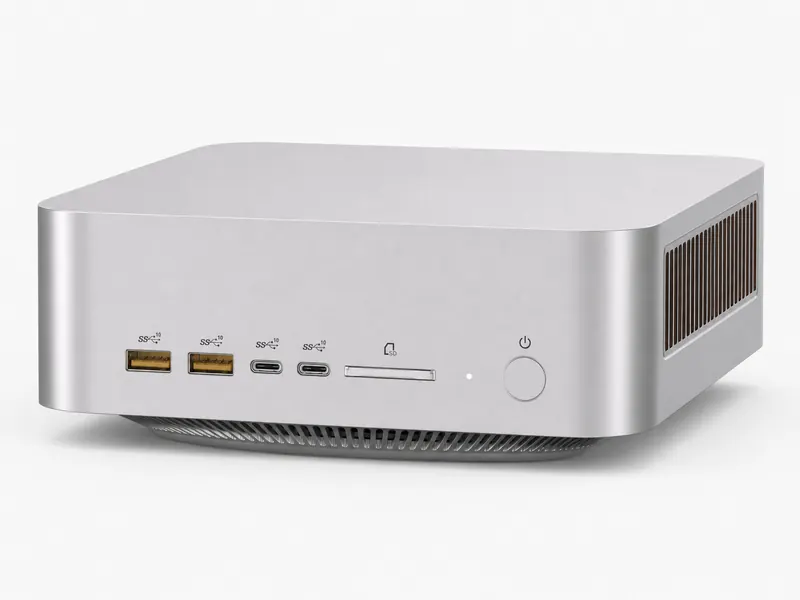
Geekom A9 Mega
Strix Halo mini PC built around the Ryzen AI Max+ 395 as a single-user local AI workstation.
Choose it if: You want a local AI workstation for one user and do not need 10GbE or an internal PCIe card.
Check price$3,799 →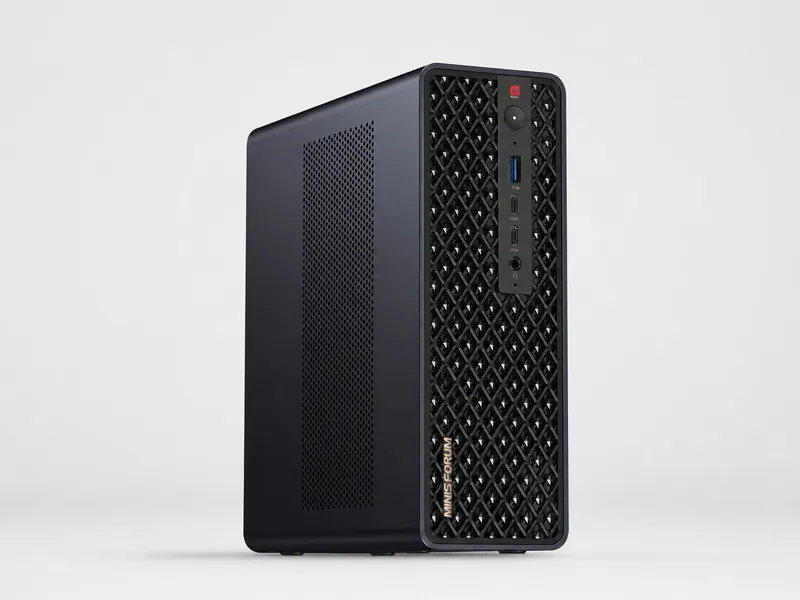
Minisforum MS-S1 Max
Strix Halo mini PC with the Ryzen AI Max+ 395 plus 10GbE networking and internal expansion.
Choose it if: You have a defined need for 10-gigabit networking or an internal PCIe card.
Check price$3,799 →Short answer
Geekom A9 Mega at $3,799 is our pick over the Minisforum MS-S1 Max at $3,799 for a single-user local AI workstation. Choose Geekom A9 Mega if you want the Strix Halo platform for one person's local AI work and have no named need for faster networking or an internal card. Choose Minisforum MS-S1 Max if 10GbE networking or a PCIe slot is a requirement you can use today, rather than a specification you might want later.
Round by round
| Round | Geekom A9 Mega | Minisforum MS-S1 Max | Winner |
|---|---|---|---|
| The chip and AI workload | Ryzen AI Max+ 395, the same Strix Halo platform as the MS-S1 Max. For a single-user local AI workstation, this is the configuration we would buy. | Ryzen AI Max+ 395, the same Strix Halo platform as the A9 Mega. No measured inference advantage either way on the evidence we have. | Tie |
| Networking | Standard networking on the specification we checked; no 10-gigabit port advertised on the listing we used. | 10GbE networking, a listed feature of the MS-S1 Max. That is the faster network path if the rest of your network can use it. | Minisforum MS-S1 Max |
| Internal expansion | A fixed mini PC configuration. Match RAM and storage to the workload you actually intend to run at purchase. | A PCIe slot for internal expansion. That helps when a compatible card fits a defined task, such as extra storage or a capture card. | Minisforum MS-S1 Max |
| Role as a single-user workstation | Our desktop starting point: the configuration we would pick for one person running local models. | Infrastructure-oriented extras that a single user may never use. The features are real, but they are not the default need. | Geekom A9 Mega |
| Value for the money | $3,799, checked 2 October 2026, for the workstation role most buyers of this chip actually want. | $3,799, checked 2 October 2026, with 10GbE and a PCIe slot included for the same money. | Tie |
| Future-proofing | Buy the RAM and storage you need now; upgrading later is limited by the fixed configuration. | The PCIe slot and 10GbE give a defined upgrade path for network and card needs that appear later. | Minisforum MS-S1 Max |
| Simplicity of the buying decision | One clear role: a single-user local AI workstation. Fewer decisions to get wrong. | Requires you to know whether you will use the expansion features. Paying for a slot you never fill is wasted money. | Geekom A9 Mega |
| Overall | The better default choice for the buyer this comparison is mostly about. | The better choice only when 10GbE or internal expansion is a requirement you can name today. | Geekom A9 Mega |
| Overall | 3 rounds | 3 rounds | Geekom A9 Mega |
2 rounds tied.
Specs side by side
| Spec | Geekom A9 Mega | Minisforum MS-S1 Max |
|---|---|---|
| Chip | AMD Ryzen AI Max+ 395 | AMD Ryzen AI Max+ 395 |
| Platform | Strix Halo | Strix Halo |
| 10GbE networking | Not advertised on the listing we checked | Yes, listed |
| Internal PCIe expansion | No | Yes, PCIe slot |
| Best role | Single-user local AI workstation | Workstation with defined network or card needs |
| Price | $3,799 | $3,799 |
Same chip: so what is different?
The difference between the Geekom A9 Mega and the Minisforum MS-S1 Max is not the processor, because both are built around the AMD Ryzen AI Max+ 395. That chip is the Strix Halo platform: a high-memory integrated design aimed at running large AI models locally. With the same silicon at the same $3,799 price, checked 2 October 2026, the buying decision moves entirely to the hardware around the chip. That is unusual in a comparison, and it is worth slowing down on, because most mini PC head-to-heads are decided by the processor. This one is not.
What the Ryzen AI Max+ 395 gives both machines is the same starting point for local AI work. The chip pairs CPU and GPU compute with a large pool of unified memory, which is the resource that determines whether a large model fits on the machine and how comfortably it runs. Because both products use the same chip, a buyer who chooses either one gets the same class of local AI capability. No measured inference comparison between these two specific machines exists in the evidence we have, so treat any suggestion that one is "faster" than the other on the same workload as a claim without support. What differs is what sits next to the chip.
Geekom positions the A9 Mega as a desktop starting point. Our reading of both listings is that the A9 Mega is the machine for a single user who wants a local AI workstation: one person, one desk, models loaded into memory, no unusual network or card requirements. That is the configuration we would buy for that role. It is also the role most buyers of a Strix Halo machine are shopping for, which is why it is our default pick rather than a niche one.
Minisforum positions the MS-S1 Max with infrastructure-oriented features. The two that matter are 10GbE networking and an internal PCIe slot. Both are listed features of the MS-S1 Max. Neither is advertised on the A9 Mega listing we checked. Those two extras are the entire practical difference between the two machines at the chip level, and the rest of this page is about deciding whether they are worth organising your purchase around.
| Geekom A9 Mega | Minisforum MS-S1 Max | |
|---|---|---|
| Chip | Ryzen AI Max+ 395 | Ryzen AI Max+ 395 |
| Platform | Strix Halo | Strix Halo |
| 10GbE | Not advertised on the listing we checked | Listed |
| PCIe slot | No | Yes |
| Price | $3,799 | $3,799 |
| Best role | Single-user local AI workstation | Workstation with defined network or card needs |
One caution applies to both machines, and it matters more than the brand on the box. When you configure either one, match the RAM, SSD and CPU suffix so the offer reflects the workstation you actually intend to buy. Listings in this class vary by memory size, and the memory size is what determines which local models the machine can hold. A cheaper variant with less memory is a worse buy for large-model work than a pricier variant with more, even with the identical chip name on both. Check the exact configuration on the store page before you order, because the $3,799 we quote is the entry point we checked on 2 October 2026, not necessarily every variant on the page.
There is no test-centre data for either machine yet. The Testbench Lab test brief, set out on 10 October 2026, defines the tests and conditions that will apply when units are run. When that happens, measured inference and memory figures will be added to the geekom a9 mega and minisforum ms-s1 max review pages, and this comparison will be updated. Until then, treat every performance statement here as a specification reading, not a measurement. We would rather say that plainly than dress a spec sheet up as a test result.
The wider field of machines on this platform is covered in the strix halo mini pc roundup, and the brand-level comparison, including models outside this pairing, is in geekom vs minisforum.
Do you need 10GbE and a PCIe slot?
You need the Minisforum MS-S1 Max's 10GbE port and PCIe slot only if you can name the task that uses them today. Neither feature automatically accelerates a model already loaded into memory, and that is the workload these machines are bought for. This section is the whole decision, so it is worth working through each feature separately.
Start with 10GbE. A 10-gigabit network connection helps when datasets or clients move enough data to saturate a slower link, and when the rest of the network supports it. Think about what a local AI workstation actually does with the network. In the common pattern, you load a model from local storage into memory once, then interact with it from the same machine. The network is barely involved. In that pattern, a 10-gigabit port and a 1-gigabit port produce the same experience, because neither is the bottleneck.
The port earns its keep in a different pattern: you move large datasets between machines, or the workstation serves models to clients elsewhere on the network, and the volumes are big enough that a slower link makes you wait. Even then, the port is only as fast as the chain around it. If your switch, your storage and your cabling are all 10-gigabit, the MS-S1 Max's port is a real advantage. If any of them is 1-gigabit, the port runs at the speed of the slowest part, and you have capability you cannot use.
| Question | If yes | If no |
|---|---|---|
| Do you move multi-gigabyte datasets over the network daily? | 10GbE pays off | 10GbE sits idle |
| Is the rest of your network 10-gigabit end to end? | 10GbE pays off | The port is capped by slower hardware |
| Do you serve models to other machines on the network? | 10GbE can pay off | 10GbE sits idle |
| Do you have a specific card to install? | The PCIe slot pays off | The slot sits empty |
Now the PCIe slot. Internal expansion helps when a compatible card fits a defined task: extra storage, a capture card, a specialist network interface. The MS-S1 Max gives you that option. The A9 Mega does not. If your requirement is on that list, the slot is worth the whole decision, and no overall brand verdict should override it. Compatibility beats preference, every time. A machine that cannot take the card you need is the wrong machine, however well it scores.
The slot also has a second life as future-proofing. A buyer who cannot name a card today but expects a need to appear, an extra storage controller, say, in a year, gets a defined upgrade path with the MS-S1 Max that the A9 Mega's fixed configuration does not offer. That is a genuine difference, and we score the MS-S1 Max ahead on it. But be honest about the difference between a requirement and a wish. A slot you might fill one day is a specification you might want later, not a requirement you can use. Future-proofing is a reason to prefer the MS-S1 Max at the margin; it is not a reason to abandon the pick that fits the job you have.
For basic chat inference, the interface question barely matters. Prioritise usable memory and the software backend you will run, because that is what determines whether the model fits and how fast it answers. Both machines can be configured around the same chip, so the backend choice, not the network port, is the bigger lever. A buyer choosing between inference frameworks, or between a model that fits in memory and one that does not, is making a decision with more consequence than the 10GbE-versus-not decision.
At the same $3,799, checked 2 October 2026, the MS-S1 Max's extras cost you nothing in money. They cost you in focus: you are buying an infrastructure machine for a workstation job. If the extras sit unused, the A9 Mega is the cleaner purchase for the same outlay. If they get used, the MS-S1 Max is the machine that saved you from an external workaround. Neither outcome is embarrassing. The point of this section is to work out which one you are in before the box arrives, not after.
The device-level detail for each machine is in the geekom a9 mega review and the minisforum ms-s1 max review.
Which should you buy?
Buy the Geekom A9 Mega if you want a single-user local AI workstation and cannot name a 10GbE or PCIe requirement. At $3,799, checked 2 October 2026, it is our default pick in this pairing, and the pick we would make with our own money for the role most of these machines are sold into.
The A9 Mega fits the buyer this comparison is mostly about: one person who wants to run large local models at a desk, with the Ryzen AI Max+ 395 doing the work and no unusual infrastructure around it. That buyer loads models from local storage, works in one place, and has no card to install. For that buyer, the MS-S1 Max's extras are features to pay attention to on a spec sheet and never again. The full device assessment is the geekom a9 mega review.
Buy the Minisforum MS-S1 Max if 10GbE or internal expansion is a requirement you can use, rather than a specification you might want later. If your network is already 10-gigabit end to end, or you have a specific card to install, the MS-S1 Max is the better machine at the same price, and it is not close: a required interface is a better reason to buy than an overall brand verdict. Our pick for the A9 Mega does not override compatibility. The device on its own is in the minisforum ms-s1 max review.
| Workload | Recommended choice |
|---|---|
| Single-user local AI workstation | Geekom A9 Mega |
| Defined 10GbE requirement | Minisforum MS-S1 Max |
| Defined internal-card requirement | Minisforum MS-S1 Max |
| Basic chat inference | Either; prioritise usable memory and backend |
Use the table as a shortcut, not a substitute for the two questions above it. "Defined" is the operative word in rows two and three. If you can write down the task, the dataset size or the card model, the requirement is defined. If you would have to think about it, it is not, and the A9 Mega is the safer default.
Three caveats keep this verdict honest. First, this is a researched verdict, not a hands-on one: no mini PC has been through our test centre yet, so the pick rests on manufacturer specifications and published listings, not on measured inference runs. When units are run under the 10 October 2026 test brief, this page will carry the numbers. Second, the specification detail on both store pages can change. We checked prices on 2 October 2026; check the configuration screen for the exact memory and storage you are ordering, because the memory size is the figure that decides which models fit. Third, the same-chip tie means our scores are close: 8.2 for the A9 Mega against 7.9 for the MS-S1 Max. A three-tenths gap is a statement about fit for the default buyer, not a statement that one machine is better built than the other.
If neither machine is right, the alternatives are in the strix halo mini pc roundup, which covers the other Ryzen AI Max+ 395 machines on the market, and the brand-level trade-offs, including service and model range, are in geekom vs minisforum. Both pages will link back here, so you can move between the pairing and the wider field without losing your place.
Frequently asked questions
Is the Geekom A9 Mega better than the Minisforum MS-S1 Max?
Geekom A9 Mega is our overall pick for a single-user local AI workstation. Both machines use the same AMD Ryzen AI Max+ 395 chip and both cost $3,799, so the pick rests on role, not performance. Minisforum MS-S1 Max wins if you need its 10GbE port or PCIe slot.
Do the Geekom A9 Mega and Minisforum MS-S1 Max use the same chip?
Yes. Both are built around the AMD Ryzen AI Max+ 395, the Strix Halo platform. With the same silicon at the same $3,799 price, the decision comes down to the surrounding hardware: 10GbE networking and a PCIe slot on the MS-S1 Max.
Does 10GbE make local AI faster?
Not usually. A model already loaded into memory does not benefit from a faster network port. 10GbE helps when datasets or clients move enough data over the network and the rest of the network supports 10 gigabits end to end.
Which is better value, the Geekom A9 Mega or the Minisforum MS-S1 Max?
They cost the same: $3,799 each, checked 2 October 2026. The A9 Mega is the better value for a single-user workstation because it matches the job. The MS-S1 Max is the better value only when you use its 10GbE port or PCIe slot, which are included at the same price.
Can I upgrade the Minisforum MS-S1 Max later?
The MS-S1 Max's PCIe slot gives you a defined expansion path for a compatible card, which is its main advantage over the A9 Mega. Match RAM and storage to your workload at purchase on either machine, because the memory size determines which local models fit.
Have these two mini PCs been tested side by side?
No. No mini PC has been through Testbench Lab's test centre yet, so this is a researched comparison based on manufacturer specifications and published listings. When units are run under the 10 October 2026 test brief, measured figures will be added to each review and to this page.
Sources
- [1]Geekom A9 Mega product page — Price $3,799, Ryzen AI Max+ 395 configuration, workstation positioning. Checked 2 October 2026.
- [2]Minisforum MS-S1 Max product page — Price $3,799, Ryzen AI Max+ 395, 10GbE networking and PCIe slot. Checked 2 October 2026.
- [3]Testbench Lab mini PC test brief — Sets out the tests and conditions for mini PCs when units are run; dated 10 October 2026. No results exist yet.