Recording an in-person class is harder than recording an online meeting, and Notta is the app we would put in front of most students first. The lecturer is metres away, the room echoes, sessions run one to three hours, and your phone's battery drains faster than you expect. The right AI note taker for a lecture hall has to survive all of that and still hand you a usable transcript and summary at the end.
For most students, the answer is a phone app rather than a dedicated recorder. Notta is our top pick for long classes: it captures live in-person audio on iOS and Android, shows a rolling transcript while the lecture happens, and its Pro plan ($97.99 a year, with an advertised 50% education discount) lets a single recording run up to 5 hours with 1,800 minutes a month — comfortably more headroom than Otter.ai's 90-minute per-conversation cap on Pro. If you sit near the front in a small or mid-size room, that is usually all you need.
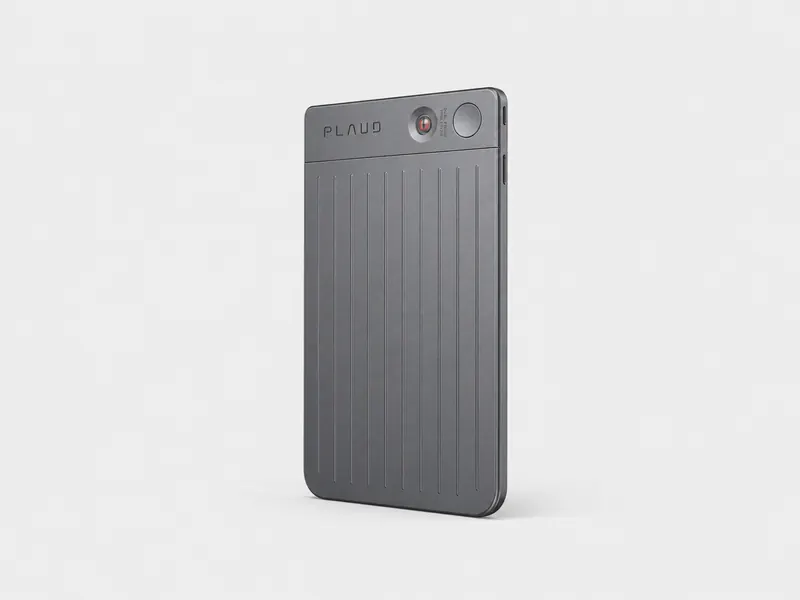
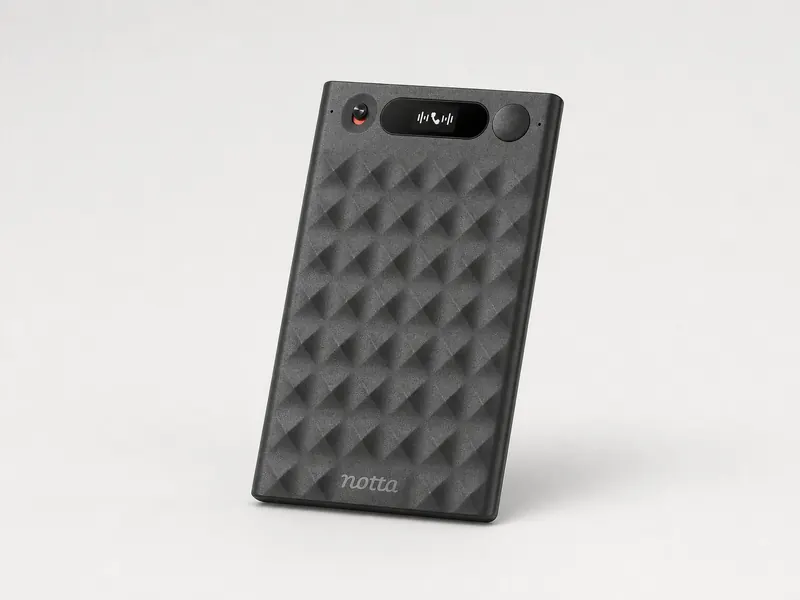
If you regularly sit at the back of a large hall, a dedicated recorder does a better job of picking up a distant lecturer. In the six-speaker classroom test the Plaud Note Pro ($189) came out ahead on English accuracy, and the Notta Memo ($149) is the better-value recorder, bundling 600 free transcription minutes a month for eligible owners. Students who pay nothing at all can use Apple Notes on iPhone or Google Recorder on Pixel, and students recording as a disability accommodation should check whether their disability service already provides Genio Notes.
Below we compare all six picks, explain how long each can record in one go, and cover the practical questions that come with recording a class: live captions, lecturer permission, and how to get a clean recording from row 15.
01 — Best overall for in-person classes
Notta
Price
Pro $97.99/year; education discount advertised as 50%
Notta is the phone app we would put in front of most students first, because it solves the two problems that break other apps in a lecture hall: session length and live feedback. A single in-person recording can run up to 5 hours on a paid plan, with 1,800 minutes a month on Pro ($97.99 a year, and Notta advertises a 50% education discount), so even a double seminar with overruns fits in one take. The live transcript scrolls on screen while the lecturer speaks, which means you can glance down, confirm the app is still capturing, and mark key moments instead of trusting a black box. Live translation is available if your class is not in English.
Pros
Up to 5 hours per recording on paid plans — no mid-lecture restarts
1,800 minutes a month on Pro, with an advertised 50% education discount
Live on-screen transcript on iOS and Android, plus live translation
Works for in-person capture as well as online meetings, so one app covers your whole schedule
Cons
The free plan includes 120 minutes of transcription a month but caps each conversation at 3 minutes, so for classes you effectively need a paid plan
Like any phone app, pickup depends on how close you sit to the lecturer
Otter.ai is the alternative for live English transcripts if you mainly want a polished live transcript with speaker labels. It records in person on iOS and Android, works offline and uploads when you reconnect, and includes 1,200 minutes a month on Pro. The limitation that matters in a lecture hall is the per-conversation cap: 90 minutes on Pro and 30 minutes on the free plan. A 90-minute class fits, but a longer session means restarting the recording and stitching notes together afterwards. The .edu price of $79.99 a year (or $13.59 a month) softens the cost for students.
Pros
Live English transcript with speaker labels on iOS and Android
1,200 minutes a month on Pro; .edu pricing at $79.99/year
Offline recording uploads automatically after reconnecting
Cons
90-minute cap per conversation on Pro (30 minutes on free) — shorter than many lectures
English-focused; less useful for multilingual classes than Notta
If your budget is zero, the free options are better than they used to be. Apple Notes records audio and generates a live transcript on iPhone 12 or later, in 10 languages, and keeps the recording attached to the note. Google Recorder is Pixel-only but transcribes on device and, on Pixel 8 and later, adds summaries. Neither matches a dedicated note taker's summaries, search, or export, and neither is cross-platform, but for capturing a lecture you can actually afford, they work.
Pros
Completely free, no subscription
Apple Notes live transcription on iPhone 12+ in 10 languages
Google Recorder transcribes on device and summarizes on Pixel 8+
Cons
Platform-locked: Apple Notes needs a recent iPhone, Google Recorder needs a Pixel
No cross-device sync of class notes, weaker summaries and search than dedicated apps
Genio Notes is built specifically for classes rather than meetings: it labels recordings by course, links notes to slides, and timestamps everything so you can jump back to the moment a concept was explained. It is often supplied by university disability services, so before paying the £12/month individual price, ask your disability office whether you already have access — many students do. Note that live captions are only available on Department and Institution subscriptions, not individual plans, and offline use requires re-authenticating within 30 days.
Pros
Designed for lectures: course labels, slide linking, timestamped notes
Frequently provided free through university disability services
30-day trial available
Cons
Live captions only on Department or Institution plans
Individual pricing from £12/month; USD pricing unverified
When you are sitting far from the lectern, a dedicated recorder beats a phone. In the six-speaker classroom test, the Plaud Note Pro posted the lowest English word error rate of any device tested, at 17.5%. Plaud advertises pickup at up to 16.4 ft (5 m) and up to 50 hours of recording, and the Starter plan includes 300 transcription minutes a month. It is the strongest pick if distance is your problem — but at $189 plus a subscription for heavier use, it is the most expensive route to class notes.
Pros
Lowest English word error rate in the classroom test: 17.5%
Advertised pickup up to 16.4 ft (5 m) and up to 50 hours of recording
300 Starter transcription minutes a month included
Cons
$189 up front, and heavier transcription use needs a paid plan
AI processing happens after sync, so there is no live transcript in class
$149; 600 minutes/month included for eligible owners
Type
Card recorder
Assessment
Hands-on use + supplied test data
The Notta Memo is our best-overall AI voice recorder, and for students it is the smarter recorder buy. At $149 it undercuts the Plaud Note Pro while including 600 transcription minutes a month on the Hardware Plan for eligible owners — double Plaud's Starter allowance — plus live translation. In the classroom test the related Notta Memo Pro scored a 20.4% word error rate, a few points behind the Plaud Note Pro, so the Plaud has a measured accuracy edge at distance; the Memo answers with a lower price, more included minutes, and the same Notta app ecosystem your phone already uses. If you want a recorder without paying Plaud prices, this is the one.
Pros
$149, cheaper than the Plaud Note Pro
600 transcription minutes a month on the Hardware Plan for eligible owners
Live translation and the same Notta workflow as the phone app
Cons
Notta Memo Pro scored 20.4% WER in the classroom test, behind the Plaud Note Pro
Like Plaud, transcription happens after sync rather than live in class
We judged every option against the five things that actually decide whether a class gets captured: pickup in a real room, a live transcript you can monitor, the cap per session, battery life, and price.
Pickup and accuracy: we used the measured results from the English classroom test (scenario C04: six speakers, open meeting room / training area, in person). The Plaud Note Pro recorded the lowest word error rate, followed by the Notta Memo Pro at 20.4% and the Plaud NotePin S at 20.9%. The Anker AI Recorder (Soundcore Work family) scored 27.7%. The C04 test distance was not recorded, and no phone was tested in that scenario, so we treat phone pickup as a seating-position question rather than a measured one.
Session caps: a class is one continuous event, so per-recording limits matter more than monthly totals. We verified the caps directly: Notta allows up to 5 hours per recording on paid plans (the free plan includes 120 minutes of transcription a month, with each conversation capped at 3 minutes), and Otter caps conversations at 90 minutes on Pro and 30 minutes on free.
Live feedback: an app that shows the transcript as it happens lets you catch a failed recording in minute two instead of hour two. Notta and Otter both do this on phones; the recorders process after sync.
Battery and price: recorders win on battery (Plaud advertises up to 50 hours of recording), phones win on cost. We weighted the education discount where one is advertised.
Is a phone good enough to record a class?
Yes, if the room is small or mid-size and you sit near the front. A phone placed on your desk a few metres from the lecturer captures speech that a back-row recording loses to distance and echo, and both Notta and Otter turn that audio into a live transcript you can watch while you write.
The trade-off is battery and session length. A two-hour lecture with the screen kept awake will test an older phone, and Otter's 90-minute per-conversation cap on Pro means a long class outlasts a single recording. Notta's 5-hour per-recording limit and 1,800 monthly minutes on Pro remove both worries for most schedules, which is why it is our default phone pick for classes. If you mainly want to read along in English and your classes are under 90 minutes, Otter's live transcript is also excellent.
If you want the full phone-versus-recorder-versus-desktop-app reasoning, we cover it in our guide to how to record lectures.
Which recorder picks up a lecturer from the back of a hall?
Once you are more than a few rows back, a dedicated recorder with better microphones and advertised pickup distance starts to earn its price. Two models stand out, and the measured classroom data separates them.
In the six-speaker classroom test, the Plaud Note Pro scored the lowest English word error rate of the devices tested, and Plaud advertises pickup at up to 16.4 ft (5 m) with up to 50 hours of recording. The Notta Memo Pro scored 20.4% in the same test — a real but modest gap — while the wearable Plaud NotePin S managed 20.9% and the Anker AI Recorder (Soundcore Work family) 27.7%.
Our recommendation: if you want most of that performance for $40 less, with 600 included transcription minutes a month for eligible owners instead of Plaud's 300 Starter minutes, the $149 Notta Memo is the better-value recorder and our overall recorder pick. One caveat on wearables like the NotePin S: a device clipped to your shirt records where you sit, not where the lecturer stands.
How long can you record in one go?
Per-session limits are the spec students most often miss. A monthly minute allowance is useless if a single recording stops at minute 30.
On phones: Notta allows up to 5 hours per recording on paid plans (the free plan includes 120 minutes of transcription a month, with each conversation capped at 3 minutes), with 1,800 minutes a month on Pro. Otter caps each conversation at 90 minutes on Pro and 30 minutes on free, with 1,200 minutes a month on Pro. Apple Notes and Google Recorder record as long as your storage and battery allow.
On recorders: the Plaud Note Pro advertises up to 50 hours of recording on a charge, and the Notta Memo's related Pro model managed 43 hours of offline recording in the battery test. Recorders also process transcription after sync rather than in real time, so a long class costs you waiting time afterwards, not recording time in the room.
Can you get live captions in class while you record?
Yes, and for many students this is the feature that makes an AI note taker worth having at all. Notta and Otter both show a live transcript on your phone during in-person capture, so you can follow the lecture, check the app is still working, and search the text later.
For deaf and hard-of-hearing students on Android, Google Live Transcribe provides free real-time captions, though it is a captioning tool rather than a note taker — it will not organise or summarise the class for you.
Genio Notes offers live captions too, but only on its Department and Institution subscriptions; individual plans do not include them. If live captions are part of your accommodation, ask your disability service which plan your institution runs.
What if you need recording as a disability accommodation?
Recording as an accommodation is a different situation from recording for convenience, and universities treat it that way. Under arrangements like Section 504 in the US, instructors are generally required to permit recording when a student's accommodation letter approves it, and disability offices often loan recorders or provide apps — Genio Notes is a common choice because it is built around classes, with course labels, slide linking, and timestamped notes.
The practical path: talk to your disability office before the semester starts. They can issue the accommodation letter, arrange the lecturer's agreement, and in many cases supply the tool, which may cost you nothing. Recordings made under an accommodation are for personal study use.
Do you need the lecturer's permission?
Check your institution's policy and ask — that is the short answer. Many universities allow recording for personal study, but policies vary by institution, by class, and sometimes by lecturer, and some course materials are covered by copyright rules that restrict recording.
Accommodation is the exception: if your disability office has approved recording, the lecturer is generally expected to permit it. For the legal background on recording consent, see our guide to recording consent laws.
How do you get a clean recording in a lecture hall?
The difference between a usable transcript and a mess is mostly setup, not software. Before the lecture starts:
Sit as close to the front as you reasonably can — distance is the biggest accuracy cost in every test we cite.
Place the phone or recorder on a solid surface, screen up, microphone pointed at the lecturer, and away from rustling paper and laptop fans.
Turn on airplane mode so an incoming call does not interrupt the recording, and carry a battery pack for back-to-back classes.
Record a 30-second test before the lecture begins and check the live transcript is picking up speech.
Mark key moments as they happen — in Notta you can note timestamps during the live transcript — so you can find the exam hints later without scrubbing three hours of audio.
Frequently asked questions
Can I record my professor without permission?
Often yes for personal study, but it depends on your institution's policy — check it and ask the lecturer. Some universities and individual lecturers restrict recording, and course materials may carry copyright. Recording approved as a disability accommodation is the standard exception: instructors are generally expected to permit it. Whatever you record with — Notta on your phone or a dedicated recorder — keep the recording for personal study use.
What is the best app to record lectures on iPhone?
For most students, Notta: it captures in-person audio on iPhone with a live transcript, allows up to 5 hours per recording on paid plans, and offers an advertised 50% education discount on Pro. If your classes are under 90 minutes and English-only, Otter.ai is a strong alternative. If you want to pay nothing, Apple Notes records and transcribes live on iPhone 12 or later.
Is Plaud good for lectures?
Yes, particularly in large rooms. The Plaud Note Pro posted the lowest English word error rate in the six-speaker classroom test and advertises pickup up to 16.4 ft (5 m) and up to 50 hours of recording. The trade-offs are the $189 price, transcription that happens after sync rather than live, and 300 included Starter minutes a month. The $149 Notta Memo is the better-value recorder if the budget matters.
How far away can an AI recorder pick up a lecturer?
Plaud advertises pickup up to 16.4 ft (5 m) for the Note Pro, and Notta recommends around 8 m for the Notta Memo 2.0 (a manufacturer reference figure). Real-world results depend on the room: echo, crowd noise, and whether the lecturer uses a microphone all matter as much as raw distance. Sitting near the front is still the most reliable way to improve accuracy.
Can Otter.ai record in-person lectures?
Yes. Otter records in-person audio on iOS and Android, works offline and uploads when you reconnect, and shows a live transcript. The main limit for classes is the per-conversation cap: 90 minutes on Pro and 30 minutes on the free plan, so longer lectures need a restart. Notta's 5-hour per-recording limit is why we rank it ahead for long classes.